
Hướng dẫn tạo user VPN trên Draytek Vigor và kết nối từ Window Client đến Draytek Vigor

Hướng dẫn​​ tạo user​​ VPN​​ trên Draytek Vigor và kết nối​​ từ​​ Window​​ Client​​ đến Draytek Vigor

Windows 10 built-in VPN to Vigor3900​​ ​​ PPTP/ L2TP over IPsec

This document introduces how to create a Host-to-LAN PPTP/ L2TP over IPsec VPN from PC to Vigor3900. There will be two parts of settings­: on Vigor 3900 and on PC.

(This article applies to Vigor3900 and Vigor2960, for other models, refer to the article here)

Configuring the Vigor3900

1. Navigate to User Management >> User Profile, click Add to add a new profile,

2. Configure the following settings:

Enable the profile.

Type Username and Password.

Enable PPTP and L2TP.

Then click Apply to save the User profile.
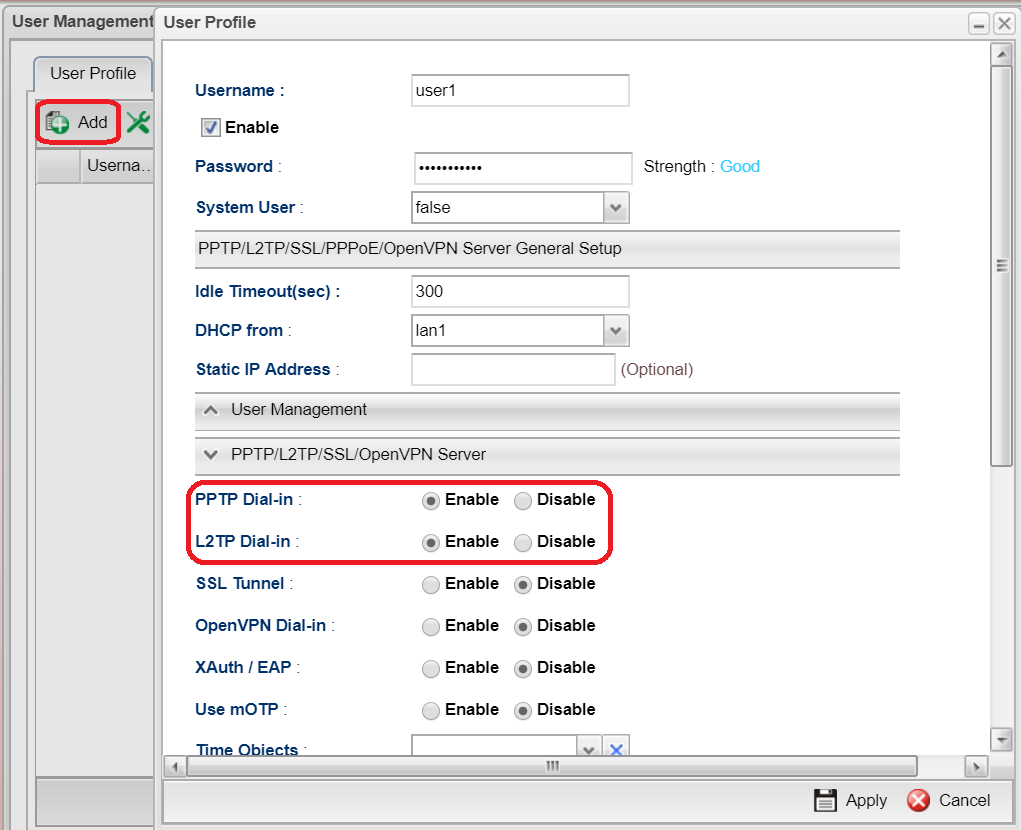
user profile   

3. Go to VPN>>Remote Access Control and enable PPTP, L2TP and select L2TP over IPsec for IPsec Remote Dial-in Service
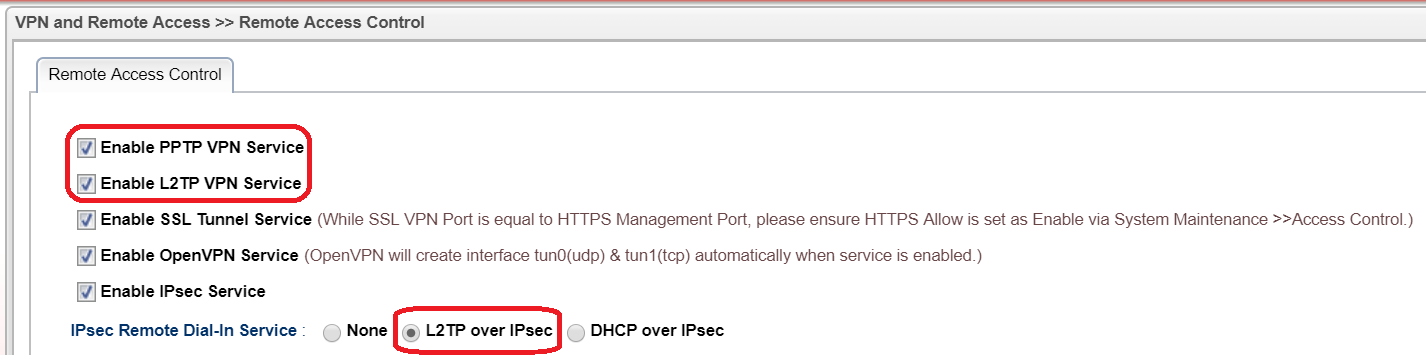
vpn general setup   

4. Go to VPN>>IPsec General Setup and enter Preshared Key for L2TP over IPsec
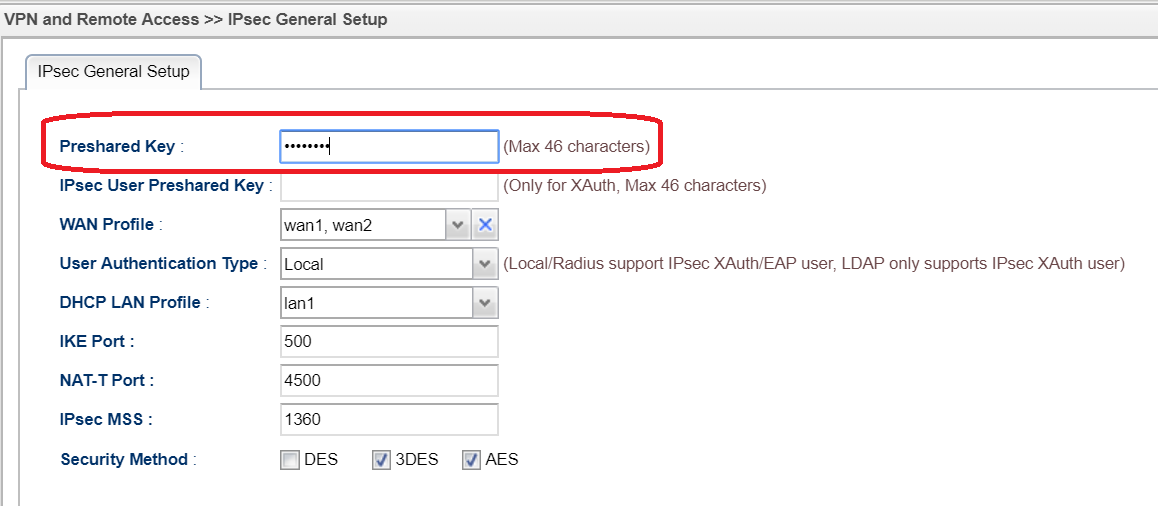
ipsec general setup   

4. If the DHCP server on Vigor3900 is disabled, you must enable Specify Remote Dial In IP in the LAN>> General Setup >> DHCP Tab.
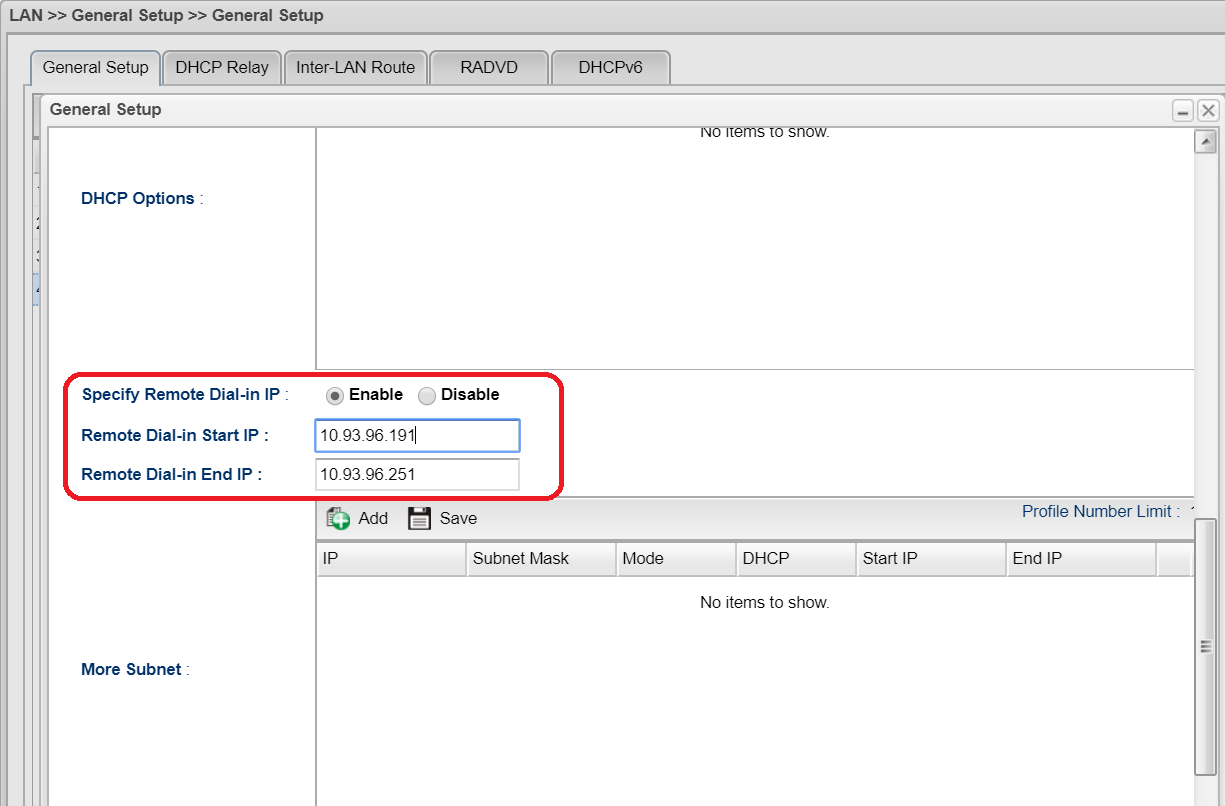
LAN dhcp   

5. Or set Static IP Address in the User Profile. Otherwise, PPTP/ L2TP VPN cannot be created successfully.
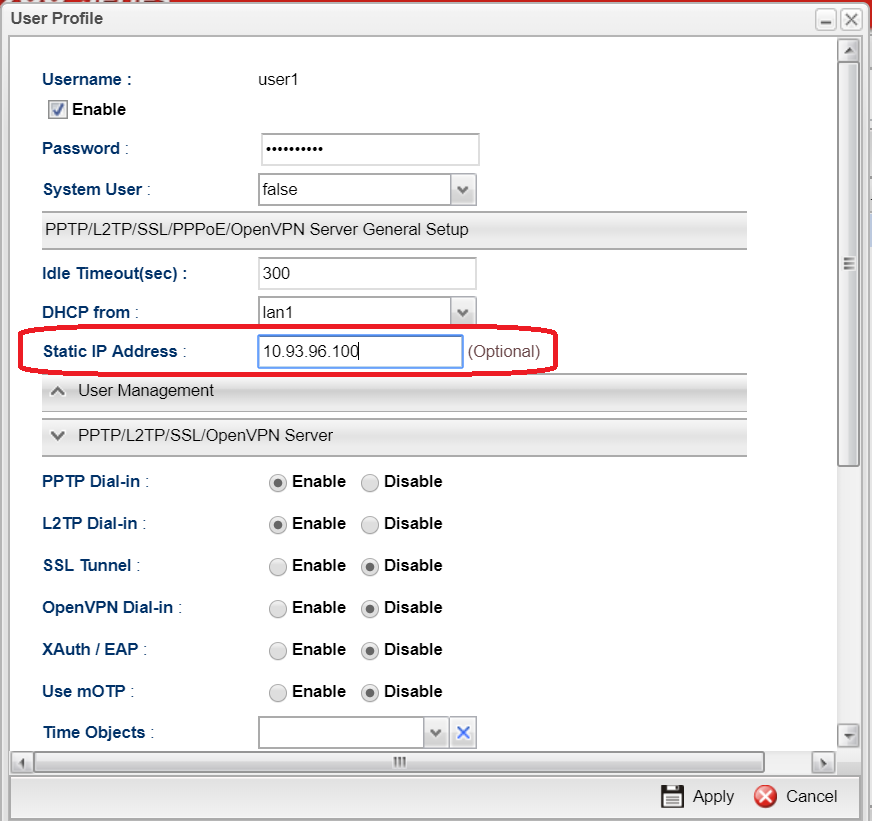
static IP   

Configuring Smart VPN Client for PPTP VPN

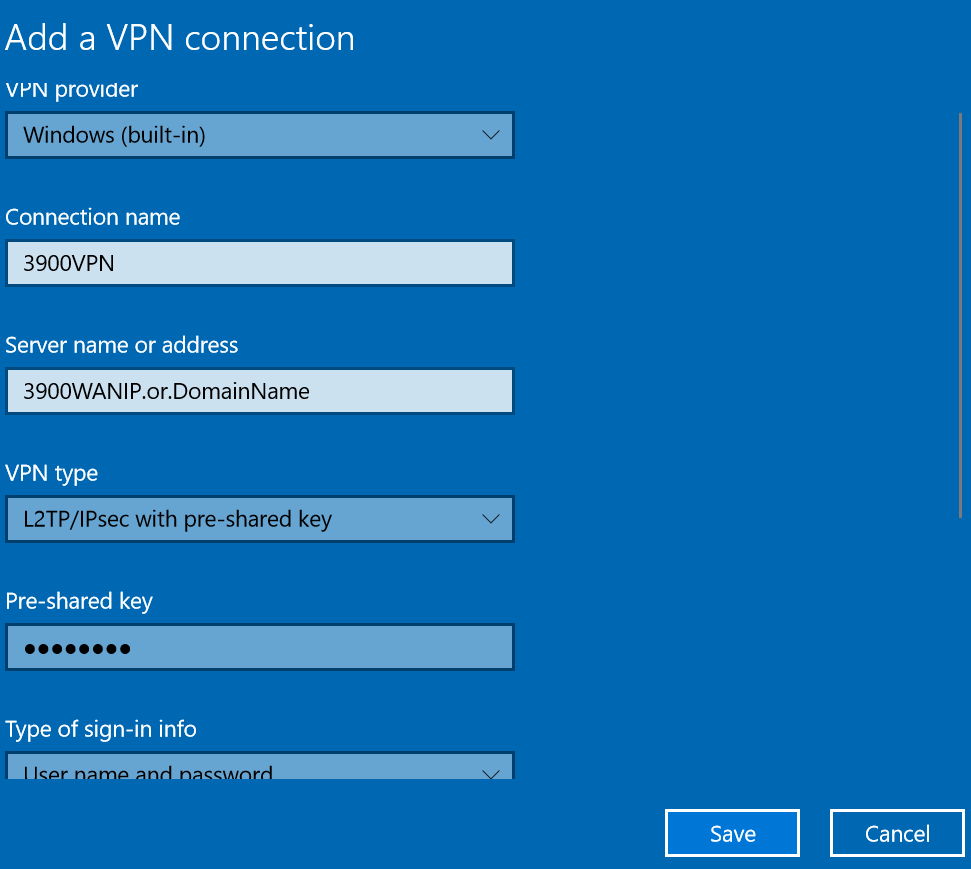
1. Go to Network & Internet Setting>>VPN and Add a VPN connection
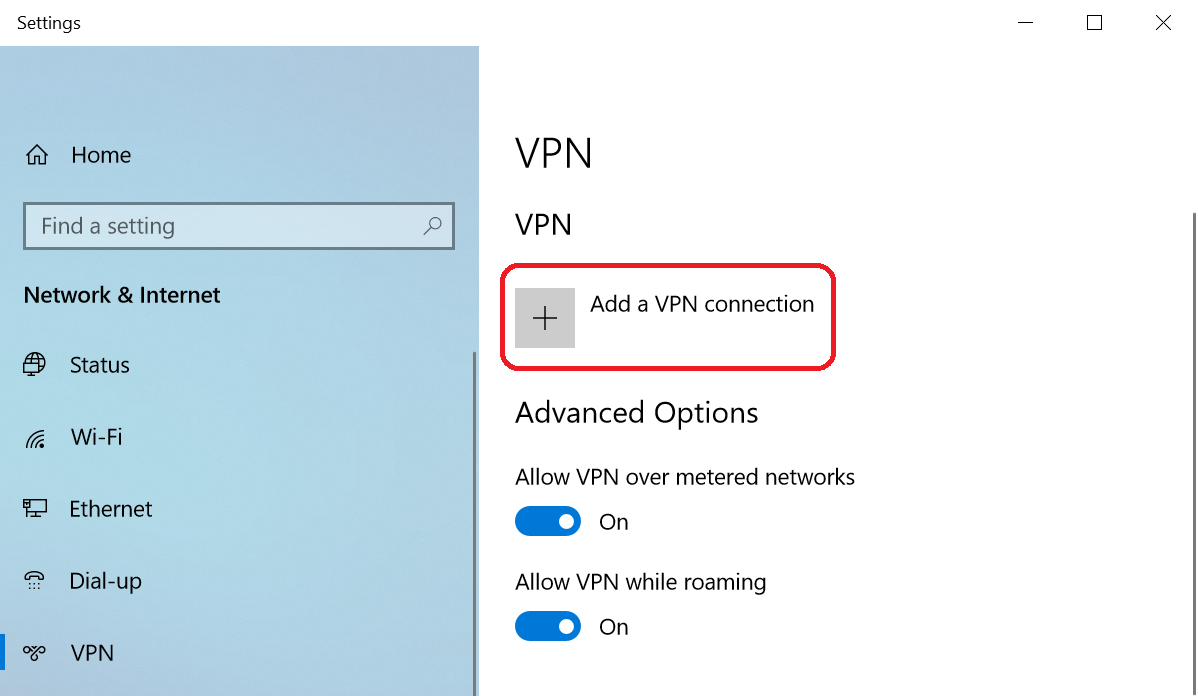
add vpn   

2. Enter WAN IP or domain name of Vigor3900

3. Select PPTP/L2TP over IPsec as VPN type

4. Enter Username, Password and Pre-shared key(for L2TP over IPsec) then save it
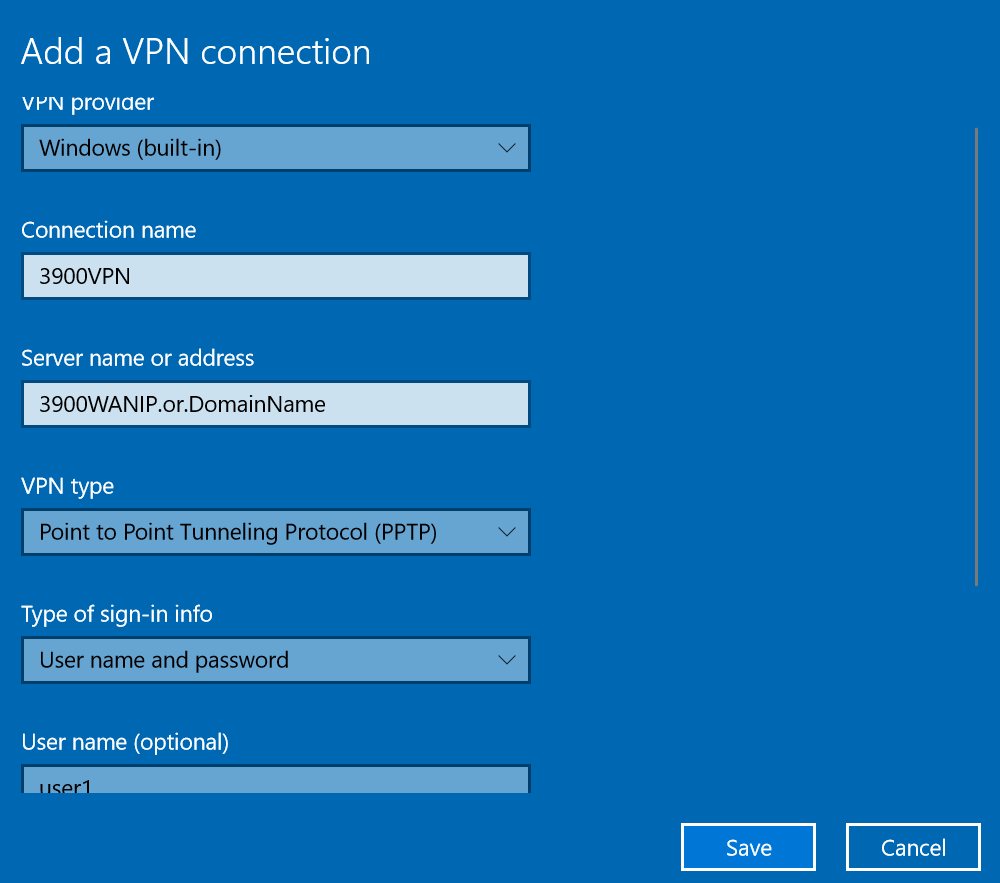
pptp setting   l2tp setting   

5. Click Connect to start VPN connection
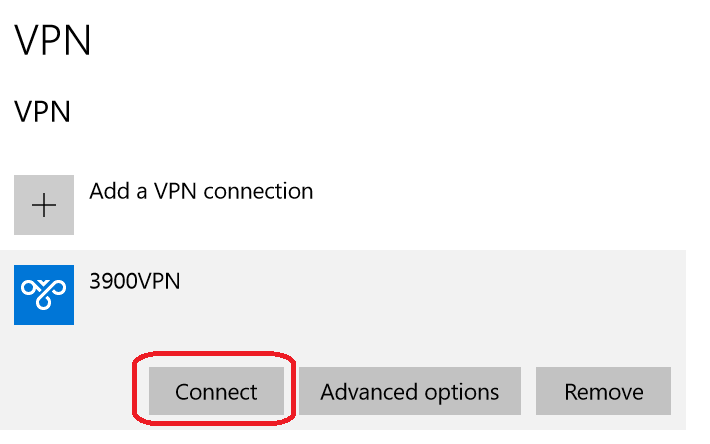
connect vpn   

Then check the status after VPN is connected

vpn connected

Như vậy là đã thành công, cảm ơn các bạn đã theo dõi
BÀI VIẾT CÙNG CHUYÊN MỤC

CẢNH BÁO BẢO MẬT: Lỗ Hổng Nghiêm Trọng CVE-2026-42533 Trên NGINX – Cập Nhật Ngay Để Tránh Rủi Ro Bị Tấn Công
CẢNH BÁO BẢO MẬT: Lỗ Hổng Nghiêm Trọng CVE-2026-42533 ...

CẢNH BÁO BẢO MẬT: Lỗ Hổng Nghiêm Trọng CVE-2026-42533 Trên NGINX – Cập Nhật ...

BACKUP DỮ LIỆU LỚN TỪ LINUX UBUNTU 24.04 LTS LÊN GOOGLE DRIVE AN TOÀN, TỐI ƯU BĂNG THÔNG
BACKUP DỮ LIỆU LỚN TỪ LINUX UBUNTU 24.04 LTS LÊN ...

BACKUP DỮ LIỆU LỚN TỪ LINUX UBUNTU 24.04 LTS LÊN GOOGLE DRIVE AN TOÀN, TỐI ƯU ...

Top 5 hệ thống LMS tốt nhất năm 2026 – Giải pháp quản lý học tập hiện đại cho trường học và doanh nghiệp
Top 5 hệ thống LMS tốt nhất năm 2026 – Giải pháp quản ...

Top 5 hệ thống LMS tốt nhất năm 2026 – Giải pháp quản lý học tập hiện đại cho ...

Hướng dẫn cấu hình SSL Let's Encrypt nhiều Website IIS bằng Win-ACME (Windows Server 2025)
Hướng dẫn cấu hình SSL Let's Encrypt nhiều Website IIS ...

Hướng dẫn cấu hình SSL Let's Encrypt nhiều Website IIS bằng Win-ACME (Windows ...

Hướng Dẫn Sửa Lỗi Không Extend Được Ổ C Trên Windows Server 2025 Do Vướng Phân Vùng Recovery
Hướng Dẫn Sửa Lỗi Không Extend Được Ổ C Trên Windows ...

Hướng Dẫn Sửa Lỗi Không Extend Được Ổ C Trên Windows Server 2025 Do Vướng Phân ...

Cảnh Báo Đỏ: Chiến Dịch FortiBleed Rò Rỉ Hàng Chục Nghìn Thông Tin Quản Trị Tường Lửa Fortinet
Cảnh Báo Đỏ: Chiến Dịch FortiBleed Rò Rỉ Hàng Chục ...

Cảnh Báo Đỏ: Chiến Dịch FortiBleed Rò Rỉ Hàng Chục Nghìn Thông Tin Quản Trị ...