
Hướng dẫn kết nối VPN từ thiết bị Android đến Draytek Vigor

Hướng dẫn kết nối​​ VPN​​ từ thiết bị Android đến Draytek​​ Vigor

Trước tiên các bạn cần có 1 account VPN đã tạo trên Draytek Vigor

Link tham khảo

https://www.draytek.com/en/faq/faq-vpn/vpn.ssl-vpn/smart-vpn-android-app-to-vigor3900-ssl/

SmartVPN Android App to Vigor3900 - SSL VPN

This document introduces how to set up Vigor3900 or Vigor2960 as a SSL VPN server and how to create SSL VPN Tunnel from Smart VPN Android app.

(This article applies to Vigor3900 and Vigor2960, for other models, please refer to the article here.)

Configuring Vigor3900 as SSL VPN Server

1. Go to VPN and Remote Access >>Remote Access Control to check if SSL Tunnel Service is enabled.

http://www.draytek.com/images/support/ApplicationNotes/Vigor3900/G52919-How_to_Setup_SSL_VPN_Tunnel/a1.jpg   

2. Go to System Maintenance >> Access Control, and select Enable for HTTPS Allow.

http://www.draytek.com/images/support/ApplicationNotes/Vigor3900/G52919-How_to_Setup_SSL_VPN_Tunnel/a2.jpg   

3. Go to User Management >>User Profile, click Add to create a new User Profile with SSL Tunnel enabled.

http://www.draytek.com/images/support/ApplicationNotes/Vigor3900/G52919-How_to_Setup_SSL_VPN_Tunnel/a3.jpg   


Using SmartVPN Android APP as SSL VPN Client

1. Download Smart VPN APP for Android from Google Play, and run the APP. https://www.draytek.com/en/assets/files/faq/2016/G59934/11-smart%20vpn%20icons.png

2. Tap the "+" button to add a new profile.
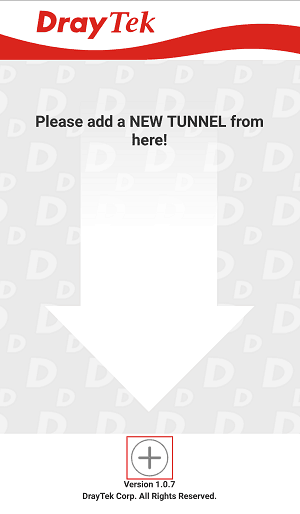
https://www.draytek.com/en/assets/files/faq/2016/G59934/12-add%20new%20tunnel.png   

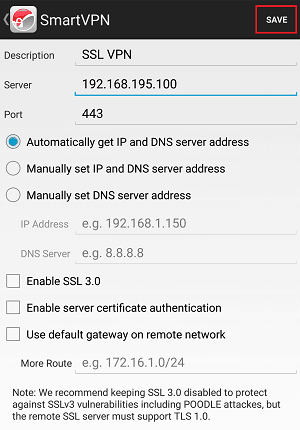
3. Edit the profile as follows:

  • Enter Description of this profile.

  • Enter Vigor3900's IP in Server.

  • Enter Port as the port which VPN server uses for SSL VPN; for Vigor Routers, it is 443 by default.

  • Tap SAVE to save the profile

https://www.draytek.com/en/assets/files/faq/2016/G59934/13-configuration.png   

Note:

  • Installation of relevant Root CA is required to enable server certificate authentication.

  • If you check "Use default gateway on remote network", all the traffic of this smart phone will be forwarded to the remote gateway.

4. Tap the profile bar to establish SSL VPN tunnel.

https://www.draytek.com/en/assets/files/faq/2016/G59934/14-click%20to%20connect.png   

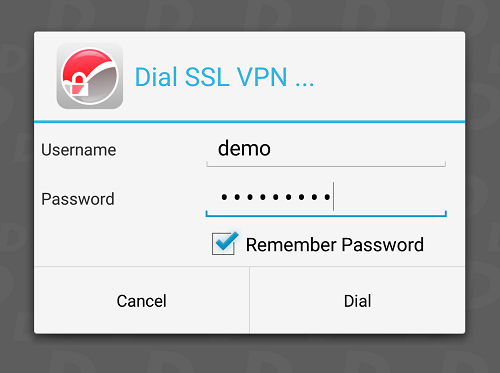
5. Enter Username and Password, then tap Dial.
https://www.draytek.com/en/assets/files/faq/2016/G59934/15-account%20and%20password.png   

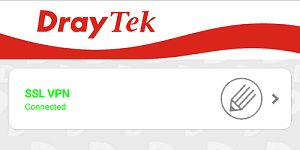
6. When the tunnel is up, the profile will turn green. Tap the bar again will disconnect the tunnel.
https://www.draytek.com/en/assets/files/faq/2016/G59934/16-connection%20establish.png   

7. Tap the pencil icon to edit or remove the profile.

https://www.draytek.com/en/assets/files/faq/2016/G59934/17-edit%20tunnel.png


BÀI VIẾT CÙNG CHUYÊN MỤC

CẢNH BÁO BẢO MẬT: Lỗ Hổng Nghiêm Trọng CVE-2026-42533 Trên NGINX – Cập Nhật Ngay Để Tránh Rủi Ro Bị Tấn Công
CẢNH BÁO BẢO MẬT: Lỗ Hổng Nghiêm Trọng CVE-2026-42533 ...

CẢNH BÁO BẢO MẬT: Lỗ Hổng Nghiêm Trọng CVE-2026-42533 Trên NGINX – Cập Nhật ...

BACKUP DỮ LIỆU LỚN TỪ LINUX UBUNTU 24.04 LTS LÊN GOOGLE DRIVE AN TOÀN, TỐI ƯU BĂNG THÔNG
BACKUP DỮ LIỆU LỚN TỪ LINUX UBUNTU 24.04 LTS LÊN ...

BACKUP DỮ LIỆU LỚN TỪ LINUX UBUNTU 24.04 LTS LÊN GOOGLE DRIVE AN TOÀN, TỐI ƯU ...

Top 5 hệ thống LMS tốt nhất năm 2026 – Giải pháp quản lý học tập hiện đại cho trường học và doanh nghiệp
Top 5 hệ thống LMS tốt nhất năm 2026 – Giải pháp quản ...

Top 5 hệ thống LMS tốt nhất năm 2026 – Giải pháp quản lý học tập hiện đại cho ...

Hướng dẫn cấu hình SSL Let's Encrypt nhiều Website IIS bằng Win-ACME (Windows Server 2025)
Hướng dẫn cấu hình SSL Let's Encrypt nhiều Website IIS ...

Hướng dẫn cấu hình SSL Let's Encrypt nhiều Website IIS bằng Win-ACME (Windows ...

Hướng Dẫn Sửa Lỗi Không Extend Được Ổ C Trên Windows Server 2025 Do Vướng Phân Vùng Recovery
Hướng Dẫn Sửa Lỗi Không Extend Được Ổ C Trên Windows ...

Hướng Dẫn Sửa Lỗi Không Extend Được Ổ C Trên Windows Server 2025 Do Vướng Phân ...

Cảnh Báo Đỏ: Chiến Dịch FortiBleed Rò Rỉ Hàng Chục Nghìn Thông Tin Quản Trị Tường Lửa Fortinet
Cảnh Báo Đỏ: Chiến Dịch FortiBleed Rò Rỉ Hàng Chục ...

Cảnh Báo Đỏ: Chiến Dịch FortiBleed Rò Rỉ Hàng Chục Nghìn Thông Tin Quản Trị ...